
How Swerve Works
Workshop 5 builds a swerve drive: a robot that can slide sideways, drive diagonally and spin, all at the same time. Almost none of the hard part is code you write. Phoenix Tuner X generates the drivetrain and the math behind it.
- Nothing installed, nothing typed. There is no code on this page.
- The words CAN bus, CANcoder and CANivore, from Hardware Setup.
- A swerve robot to look at, for the check at the end.
What you do have to understand is how a swerve robot answers two questions, which way is forward, and where am I on the field. Four ideas cover that, and every page after this one leans on all four.
A swerve robot tracks a position on the field, and the driver's forward is not the field's forward.
What makes a drive "swerve"
On most drivetrains the wheels are bolted facing one direction. To go sideways you first have to turn the whole robot. A swerve drive puts a module at each of the four corners, and each module has two motors. One spins the wheel, the other points it.
Because every wheel can point wherever it likes, the robot can travel one way while facing another. The two are independent. It can drive straight down the field while slowly spinning. The word for that is holonomic motion, and it is the whole appeal.
You never write the swerve math
Turning "move 2 meters per second to the left while turning slowly" into eight motor commands is called kinematics. Tuner X's swerve generator writes it for you, in two files you will meet on the next page. TunerConstants.java holds every device ID, gear ratio, wheel radius and gain. CommandSwerveDrivetrain.java is the drivetrain itself: the motors, the sensors, and odometry.
You ask for a chassis speed. Those two files decide what all eight motors do. Nothing in Workshop 5 asks you to compute a wheel angle.
The parts are the same family you met on Hardware Setup: Kraken motors, a CANcoder in each module to report the steering angle, and a CANivore carrying the bus. Swerve adds one device the arm never needed: a Pigeon 2 gyro, which reports which way the robot is facing. TunerConstants.java lists it as kPigeonId, alongside three device IDs and a corner position for each of the four modules.
Driver forward
You push the left stick away from you. Which way does the robot go? There are two answers, and a swerve robot has to be told which one you meant.
- Robot-centric
- Forward means the direction the robot's front is pointing. Spin the robot and forward spins with it. Fine while the robot is pointing away from you; the moment it turns around, its left is your right and every input is mirrored. Needs no gyro: the robot does not have to know its heading to drive relative to itself.
- Field-centric
- Forward means down the field, away from your driver station, no matter which way the robot is facing. Push the stick away from you and the robot moves away from you, even if it has to drive backwards to do it. This is what makes a swerve robot drivable by a human. It needs the gyro, because the code has to subtract the robot's heading out of your request.
The workshop code only ever drives field-centric. The teleop OpMode you get on the next page builds one SwerveRequest.FieldCentric and hands it to the drivetrain's default command. No file in the workshop code builds a robot-centric request.
The driver's forward flips with alliance color. The field frame does not.
Two drivers stand at opposite ends of the field. Both should be able to push the stick away and watch the robot go away. So the code flips what "forward" means depending on which side you are on. Every loop, applyOperatorPerspective checks the alliance color. Blue sees forward as 0 degrees, toward the red wall. Red sees forward as 180 degrees, toward the blue wall.
Hold on to this, because the next section is the other half of it: only the driver's forward flips. The field's coordinates never do.
Where am I? Pose2d
A Pose2d is three numbers in one package. It answers where on the field and which way around at the same time. The robot's current position is a Pose2d. So is a spot you want to drive to.
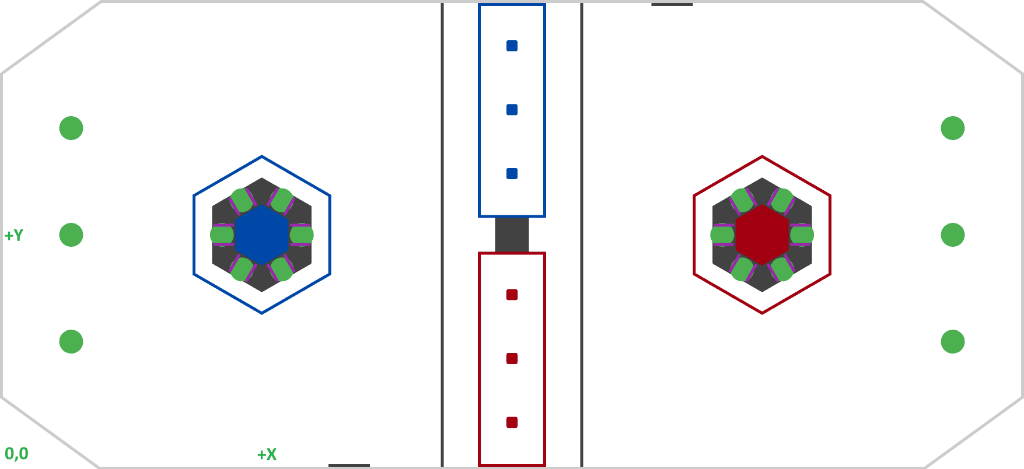
- X: meters down the length of the field, increasing away from the blue driver station.
- Y: meters across the field, increasing to the left.
- Rotation: a
Rotation2d, the direction the front of the robot points. 0° faces down the field along increasing X. You build one withRotation2d.fromDegrees(180), or take a ready-made constant likeRotation2d.ZERO.
They travel together for a reason. A position with no heading does not say which way the robot points when it arrives. A heading with no position does not say where it is.
(0, 0) is the blue corner, even when you are on red
drivetrain.getPose() measures from the blue alliance corner on both alliances. This is the one that catches people, because the section above said forward does flip. Both are true, and they are about different things. The driver's forward flips so driving feels the same from either end of the field. The coordinate frame stays put so that two poses can be compared at all. A red robot parked against its own wall reports a large X, not zero.
Every pose in Workshops 5 and 6 is measured from that same blue corner. That covers what odometry reports, what the camera estimates, and the target you hand a drive command.
Odometry, and why it goes wrong
Odometry is how the robot keeps a running answer to "where am I." Every loop, the drivetrain reads how far each wheel turned and where it was pointing. It works out how far the robot moved in that slice of time and adds it to the pose. You never call any of that. You read the answer with drivetrain.getPose().
It starts out excellent and gets worse all match, because it is addition and it never subtracts. Three things it cannot see:
- Slip: A wheel spinning on carpet without moving the robot still reports distance. Odometry counts it as travel.
- A wheel radius that is slightly wrong: Distance per rotation comes from a number in
TunerConstants.java. If that number is off by 1 percent, every distance is off by 1 percent. That is 10 centimeters for every 10 meters, always the same way. - Being moved without driving: Get shoved, get pinned, get lifted: the wheels do not turn, so as far as odometry is concerned nothing happened.
Nothing in odometry ever looks at the field, so there is no moment where it notices it is wrong. That is what "drift" means here: not noise, but an error that only accumulates.
Two fixes, and they are the next pages
- Measure the numbers it is built on. Wheel radius, top speed, steering offsets: that is Swerve Calibration. Better inputs mean slower drift.
- Give it something that does look at the field. A camera reading AprilTags knows where it is in absolute terms.
DriveMechanismalready has the door for it,addVisionMeasurement(...), which hands a camera's estimate to the drivetrain to correct odometry. That is Vision.
Until one of those happens, treat the pose as distance and direction traveled since the code started, which is honest and still useful.
Check your work
Find each part on a real swerve robot before the next page asks you for its CAN ID. Power off. Stand behind it with its front pointing away from you.
- Name the four corners out loud: front left, front right, back left, back right. Put a strip of tape with the name on each module.
- On one module, find the motor that spins the wheel, the motor that points it, and the CANcoder on top that reads the angle.
- Find the Pigeon 2 and the CANivore. Count the devices on the bus.
You should see
Thirteen devices: eight motors, four CANcoders, and one Pigeon 2, all on the CANivore. Four taped corners, named from behind the robot, so the IDs you write down on the next page land on the right wheel. Fewer than thirteen is a wiring fault to fix first.
Check yourself
You are driving field-centric. The robot is facing your driver station: its front points at you. You push the left stick away from yourself. What does the robot do?
What does field-centric control need that robot-centric control does not?
Your robot is on the red alliance. Your driver pushes the stick away from the red driver station and the robot moves away from them. What happened to the coordinate frame odometry reports?
What three things does a Pose2d hold?
Why does odometry drift over the course of a match?