
Vision
Wheel odometry adds up wheel turns, and it drifts. An AprilTag sighting is absolute, occasional, and noisy. This lesson feeds sightings into the pose estimator so the camera pulls odometry back toward the truth.
- A camera mounted, wired and calibrated in Vision Hardware, and its name written down.
- Odometry you trust, from Swerve Drive Tuning. Vision corrects drift, not a wrong wheel radius.
- The swerve project.
- An AprilTag. A printed one on a wall works.
No camera in simulation
None of this runs in the simulator. There is no camera, so nothing publishes to NetworkTables, the frame queue comes back empty, and the update method returns every loop. Check this page on the real robot.
Install the library
LimelightLib used to be a single file you copied into your project and re-copied whenever it changed. It is a vendor dependency now, the same kind of thing as Phoenix 6, so VS Code fetches it and Gradle keeps it.
Open the WPILib Vendor Dependencies view from the activity bar on the left. Expand INSTALL FROM URL, paste the URL below into the box, and press Install.
https://limelightvision.github.io/limelightlib-public/LimelightLib-alpha7.json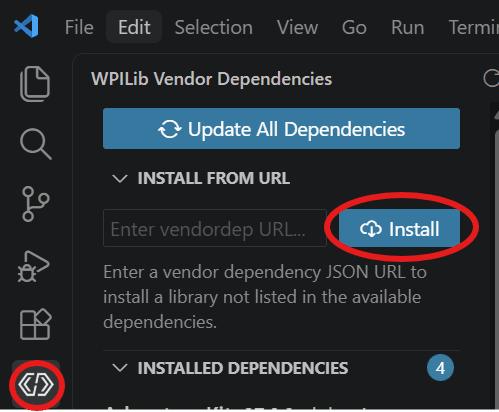
Build once so Gradle pulls the jar. You now have com.limelightvision.Limelight, which is one class per camera with everything the camera publishes hanging off it.
MegaTag1 and MegaTag2
The camera solves the same frame two ways, and you pick which answer to believe.
MegaTag1 solves position and heading from the geometry of the tags in frame. Two or more tags spread across the image constrain that geometry well. One tag does not. A small error in the measured corners swings the solved heading, and the position follows it.
MegaTag2 takes your heading as given and solves only for position. One tag is enough. The heading goes in uncorrected, so a gyro ten degrees out returns a position that is wrong and looks fine.
One frame at a time
Create src/main/java/frc/robot/subsystems/Vision.java. It is called Vision and not Limelight because the library owns that name now.
private static final double XY_STD_DEV_COEFFICIENT = 0.333;private static final double ROTATION_STD_DEV_COEFFICIENT = 1.5;private static final double MAX_TAG_DISTANCE_METERS = 4.0;private static final double IGNORE_VISION_HEADING = 9_999_999;private static final int MIN_TAGS_FOR_MEGATAG1 = 2; private final Limelight camera;private final DriveMechanism drivetrain; private Vision(String name, DriveMechanism drivetrain) { this.camera = new Limelight(name); this.drivetrain = drivetrain; camera.setUseSharedOrientation(true);} public static void registerAll(DriveMechanism drivetrain, String... cameraNames) { Scheduler.getDefault() .addPeriodic( () -> Limelight.setSharedRobotOrientation( drivetrain.getPose().getRotation().getDegrees())); for (String name : cameraNames) { Vision vision = new Vision(name, drivetrain); Scheduler.getDefault().addPeriodic(() -> vision.update()); }}A camera drives nothing, so there is nothing for the scheduler to hand out. addPeriodic runs the update every loop instead. One heading write serves every camera on the robot. setUseSharedOrientation(true) tells a camera to read the shared topic, and the static setSharedRobotOrientation writes it once per loop. Two cameras cost one write, not two.
Now the read. readResultsQueue() hands back every frame that arrived since the last call, which is usually one and is sometimes none or two. Working the queue rather than asking for the latest value means no frame is skipped. It also means one frame never goes into the estimator twice.
Ask MegaTag1 first, then read fieldedTagCount off the answer. Under two tags, ask the same frame again as MegaTag2. The second solve is cheap because the frame is already in hand.
private void update() { for (LimelightResults frame : camera.readResultsQueue()) { PoseEstimate estimate = camera.getPoseEstimate(frame, PoseEstimateType.MT1_WPIBLUE); if (estimate.fieldedTagCount < MIN_TAGS_FOR_MEGATAG1) { estimate = camera.getPoseEstimate(frame, PoseEstimateType.MT2_WPIBLUE); } if (estimate.rejectionFlags != 0 || estimate.avgTagDistanceMeters > MAX_TAG_DISTANCE_METERS) { continue; } double distanceFactor = Math.pow(estimate.avgTagDistanceMeters, 1.2); double tagFactor = estimate.fieldedTagCount * estimate.fieldedTagCount; double xyStdDev = XY_STD_DEV_COEFFICIENT * distanceFactor / tagFactor; double headingStdDev = estimate.isMT2() ? IGNORE_VISION_HEADING : ROTATION_STD_DEV_COEFFICIENT * distanceFactor / tagFactor; drivetrain.addVisionMeasurement( estimate.pose, estimate.timestampSeconds, VecBuilder.fill(xyStdDev, xyStdDev, headingStdDev)); }}rejectionFlags is the library's own verdict on the frame, and zero means it found nothing wrong. A fresh new Limelight(name) already carries sensible gates. It throws out a single tag past three meters, a single tag whose ambiguity is over 0.7, and any solve with no fielded tag. That last gate is why tagFactor can never be zero. When a frame does get rejected, PoseEstimateConfig.describeRejection(flags) names the reason.
The trust weighting
Every sighting goes into the estimator with a standard deviation: how far off it might be, in meters and radians. Bigger means trust it less, and the estimator blends the sighting against the wheels in that proportion.
Distance hurts gently and tag count helps hard. Doubling the distance multiplies the error bar by about 2.3, while a second tag divides it by four. One tag at two meters gives about 0.77 m. Two tags at the same distance give about 0.19 m. That ratio is the argument for the mounting rule on the last page.
The heading MegaTag2 returns
MegaTag2 solved that pose from the heading you handed the camera a few lines earlier. Feeding it back as a measurement would be the robot agreeing with itself, growing more confident every loop. So MegaTag2 estimates go in with IGNORE_VISION_HEADING, which the estimator reads as infinity. MegaTag1 heading is a real observation, and it gets a real weight.
The measurement goes in with estimate.timestampSeconds, not the current time. The picture was taken, processed and sent before your code saw it, so the robot has already moved. The estimator winds its history back to that moment, folds the sighting in there, and replays forward.
One line in Robot's constructor starts it: Vision.registerAll(drivetrain, "limelight"), plus import frc.robot.subsystems.Vision;. Not in an OpMode. Those bindings are torn down on a mode switch, and vision has to keep correcting in every mode. A second camera is a second string.
Check your work
Deploy, put the robot on the floor with a tag in view, and watch Drivetrain/Pose in NetworkTables.
- Park about two meters from a tag and note the pose. Cover the camera and push the robot a meter sideways. The pose follows the wheels.
- Uncover the camera. The pose settles toward where the tag says the robot is, over a second rather than in one frame.
- Back away past four meters, then close in again. Line up on two tags, then on one.
You should see
The pose walks back to the truth once a tag comes into view, rather than jumping there. Corrections stop past four meters and resume when you close in. With one tag in view the position moves and the heading does not budge.
Three things go wrong here. A pose that never moves is almost always the name: the string in registerAll has to match the camera's NetworkTables table exactly. A pose that jumps somewhere impossible means the offsets are wrong. If it lands on the far side of the field, a red-origin pose is going into a blue-origin estimator. That is why the code asks for MT1_WPIBLUE. Position that corrects on two tags and goes strange on one is the MegaTag2 path, so seed the gyro. Not with seedFieldCentric(), which only changes which way the sticks call forward: Swerve Calibration has the three kinds of zeroing.
Check yourself
The camera has exactly one AprilTag in frame. Which solver does Vision.java ask for, and why?
Why does the code walk readResultsQueue() instead of reading the camera's latest result?
What does a rejectionFlags value of zero tell you about a pose estimate?
The robot sees two tags at 2 m instead of one tag at 2 m. What happens to the position standard deviation?
Why does a MegaTag2 estimate go in with a heading standard deviation of 9,999,999?
Why does registerAll get called from Robot's constructor rather than from an OpMode?